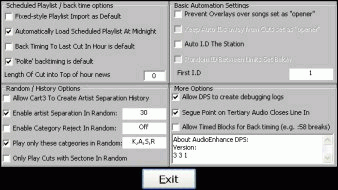
Accessed through automation options :
The reserved categories , DRY and TRACKED will, by default, fit to the vocal of a non-reserved audio cut by using the intro tone. You can specify that these reserved categories DO NOT overlay intros on audio cuts you have marked with the opener property. Some people think certain intros are too "busy" to be overlain, or consider it bad practice to talk all over the intro, so we supply this option.
Enables or disables the AutoID functionality.
++++++++++++++++++++++++++++++++++++++++++++++++++++++
Allow dps to create debugging logs.
Default - on. If you ever have a problem with automation, we will ask you for these logs in order to determine the problem.
The tertiary tone can be set in Edit Player to any audio cut. The tertiary tone will open the line in on any sound card on your system. This option ensures the line in port is closed when the segue point is reached on the cut that opened the line in, which is normally, but not always, desirable.
If you want DPS to intelligently decide on advert blocks in scheduled playlists, and backtime, for example, a :58 break to the top of hour junction, you need this option on. This is a highly advanced scheduled playlist automation feature.