All DPS registration codes, demo codes and licences are on a per-machine basis and you will need a unique code from us to run even a demo of DPS on your computer.
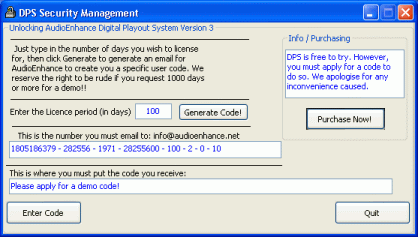
When first running an unregistered version of DPS, you will be presented with this screen:
If running a demo, this is what to do:
Enter the licence period (in days) : type 10
Now press Generate code button. After a short delay, DPS will generate an email to send to us with
this code in it. If you need to send using a different email software,you can use copy and paste.
Do not try to type the code directly into the email , as this is prone to mistakes and will result in a delay in issuing your code!
If renewing or updating a license, follow the instructions above but type in the number of days you require, as agreed by AudioEnhance.
Now wait for the code to arrive by email. It is NOT from an auto-generator, it is made especially by DPS staff. You should receive a code well within a few hours, if not quicker. Close DPS whilst you are waiting. Do not run it again until the email from us arrives. Do not generate the code again , or you will invalidate your key!
Highlight and erase the "Please apply for a demo code" text, or any numbers that are already present. Paste the code sent to you in this position, followed by the Enter Code button. DPS will start.
If you are asked for an extension code, DO NOT CLOSE DPS. Email us immediately, or IM us. (First - time users will not need to worry about this.