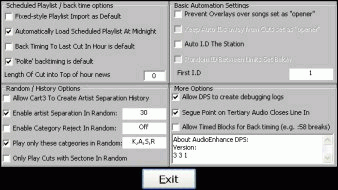
Accessing - see Automation options
Fixed-style playlist Import as default. Unless you are an established DPS user, using .log scheduled playlist files and know exactly what this option does, this option must be UNCHECKED to allow scheduled playlist import for DPS with the default apl filename extension.
Recommended - on. The next day's scheduled playlist will load shortly before midnight, even in manual mode.
Recommended - on. DPS will politely move a scheduled playlist to a new hour once an hour (at 59:00) in order to keep overscheduled playlists on track.
If you are using backtimed scheduled playlists with a news junction at the top of the hour, you may need to tell DPS how many seconds before the top of the hour to start the news sequence (which typically is a short news in jingle, followed by perhaps 3 minutes of silence). You do not need to use this option if you are using Exact Time Markers
Random / History Options
Basic Automation Settings
More Options