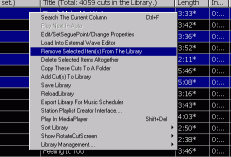
This option allows track(s) to be removed from the library without the underlying music file being erased. The selected deletion will be the one high lighted. To remove more than one it is necessary to hold down the Ctrl key and click each track in turn. With multiple tracks selected the Ctrl key must continue to be pressed whilst right clicking to bring up the menu. Clicking on the link will then remove the selected ones. If removed in error follow the Add Custs Option to restore. You can use a combination of ctrl and shift to emulate standard windows behaviour. Note, however that you must keep these held down whilst right-clicking to activate the options. This is to protect against "accidental" deletion of audio.
A point worthy of note is also the deliberately peculiar way in which one can select a contiguous block of songs in the library; one uses ctrl + shift, not just shift as in the normal Windows convention. This is a bit sneaky, and will hopefully stop bored disk-jockeys from "accidentally" deleting a lot of audio. (This often seems to include mostly the songs they dont like playing......)